Showing posts with label Tablets. Show all posts

Thursday, November 8, 2012

Tablet Holiday Shopping Guide (Part 1)

As I've mentioned before in a previous post competition is a good thing. It leads to choice among consumers, and choice usually means lower prices all around. The holiday season tends to be one of the busiest times in the mobile industry. Manufacturer's all around are looking to release their products in time to be picked up as a Christmas present. This year is shaping up to be one of the busiest seasons ever. Today I'm looking to try and make the tech shopping process easier. Tablets have become a very popular gift, and while they initially carried a hefty price point in recent months they've dropped down in price. So now you've got all these new shiny well priced tablets to pick from, and it can be overwhelming; especially when you want to be sure to get the best possible tablet for the person you're shopping for.

iPad
First up I'll discuss the world's most popular tablet the iPad. Last month Apple came out with their 4th generation iPad with retina display. It features a gorgeous 9.7" 2048 x 1536 resolution display. It runs the newest iOS 6, and features a dual-core A6X processor with quad-core graphics processing. Now what does this all mean? That it should run buttery smooth and be great for content consumption. Now the downside to this is it's pricing. The 16GB, 32GB, and 64GB cost $499, $599, and $699 respectively. The LTE enabled versions cost $130 more for the same storage. LTE is available on Verizon, Sprint, and AT&T. Now who is this good for? Someone who already owns an iPhone, or iPod touch will benefit a little more from this as they'll be able to use all their same apps across their devices. Also someone who isn't very tech savvy or is looking for a very simple operating system will be able to pick it up relatively quick. Someone who is also looking for top quality mobile games will also be pleased with the iPad.

Transformer Pad Infinity
Next up is the Asus Transformer Pad Infinity. Now this device can easily go toe to toe with the iPad and is generally one of the best Android tablets to date. It features a 10.1" 1920 x 1200 Super IPS+ display. It's hard to describe how beautiful the display looks in person, and although it's a slightly lower resolution than the iPad it's negligible. The design itself says premium with a metallic spun finish on the back. They also made it incredibly bright capable of outside viewing with ease. It's powered by a 1.6GHz quad-core Tegra 3 processor with a 12-core graphics processor, and 1GB of RAM. It runs Android 4.0 (ICS) with a promise to upgrade to Jellybean (4.1) and considering ASUS' track record of timely updates it shouldn't be too far. Now what does this all mean? It means that this thing will blow through whatever you throw at it. It will be great for content consumption with that gorgeous display, and then throw in the optional dock, and you turn it into a notebook and you've got a toy for work and play. Now it starts at $499 for the 32GB version providing you with twice the storage as the iPad for the same price. Now the optional dock will run you $149 but it adds extra battery power, a full keyboard, multi-touch track pad, full USB port, and an SD card slot. Who is it good for? Those who already own an Android device so their apps will carry over. Also anyone looking for a slick device to consume content on but also get some work done. Those who like to carry around their media will also benefit as it provides twice the storage for the same price as an iPad along with expandable storage via the SD card slot. People who love customization will also enjoy this device as Android is unparalleled in terms of customization.

Now so far these have all been some pricey and high-end devices. But the days of needing to drop a few hundred dollars for a good performing tablet are over. So now for some of the best budget friendly tablets.
Nexus 7
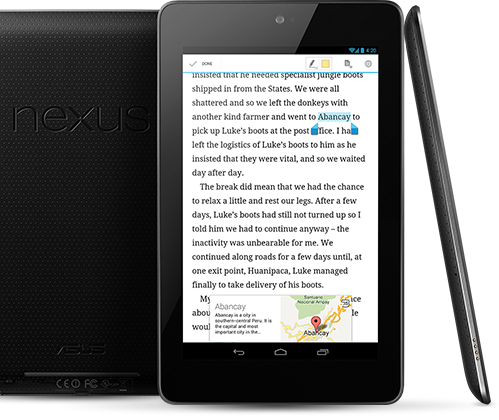
Starting us off is the ASUS made Nexus 7. Now this device was made as a response to the sudden demand for a cheaper but still powerful small and portable tablet created by Amazon's Kindle Fire devices. The tablet features a 7" 1280 x 800 display and while it might seem low to some because it's only 7 inches it looks beautiful. Under the hood it's powered by a Tegra 3 quad-core processor and 1GB of RAM. Now where it really sets itself apart is in the pricing, for the 16GB version it starts at $199, $249 for 32GB, and $299 to add HSPA+ (unlocked.) Now this is a pretty hard package to beat especially when you add in NFC, Android 4.1, and a 1.2MP front facing camera. Also keep in mind since it's a nexus device it will be supported by Google in the long term and with timely software updates. So what does this all mean? That the tablet will run smoothly and breeze through most tasks, it'll also be great for consuming content on the go. So who should get this? Anyone really, it's portable high powered and will be well supported. It's especially well suited to anyone who just wants to browse the web, watch HD video, or play some cool games on the go.

Continue to Part 2 here.

Wednesday, November 7, 2012

Innovating? (Part 2)

XPS 12 Convertible Ultrabook
Now Windows 8 is apparently what all the manufacturer's were waiting for in order to start getting creative with their designs. Even Dell decided to join the party with their creative convertible XPS 12 Ultrabook. It features a fully rotatable screen allowing you to flip the screen so it faces the other side and turns into a tablet. The body itself offers a very premium, and durable feel. It features a machined aluminum, carbon fiber, and the glass is Corning Gorilla Glass. After years of some pretty standard or mediocre designs it's nice to see Dell branching out and trying new designs.
ATIV Smart PC


Samsung is also trying their hand at the convertible tablet/pc combo with their new ATIV Smart PC. Now it's noticeably similar to Asus' initial approach. However they have also added their own tweaks to the design, making it more streamlined, and providing it with S Pen functionality. While not as original as some of the other designs we've seen here it's still nice to see them at least try a different approach to their laptops. Although I do hope to see something more original from Samsung sometime in the future. They might just be playing it safe unsure if these new convertibles will sell well.


VAIO Duo 11
Sony, and Toshiba both decided to approach their designs in a rather similar design. They implemented a screen that slides over the keyboard, and track pad to cover it, and put the screen front and center. Sony's solution comes in the form of the VAIO Duo 11 with an 11.6" screen. Toshiba's is the Satellite U925t Ultrabook which features a 12.5" screen. However the difference comes in the fact that instead of a touch pad the VAIO has a trackball and relies more on the touch screen and included stylus. Whereas the Satellite does come with a touch pad, other than that however the two are quite similar.


Satellite U925t
Overall I'm quite excited for the new influx of creative designs, and to finally see manufacturer's branching out and experimenting with new things. I think this can only lead to new more creative and fun designs. We're finally seeing the end of the traditional simple clamshell laptop design. Microsoft has done something interesting, unique, and new with Windows 8; and as a result we're finally seeing manufacturer's follow suit and trying new things.

Tuesday, November 6, 2012

Innovating?

Editor's Note: Because of an issue I had with the site, the original article was lost before I could back it up, as such I have had to rewrite it and have broken it up into two parts.

Transformer Pad Infinity
Competition is a good thing, particularly when it drives innovation. When the first Android tablets running 3.0 Honeycomb (the tablet optimized OS for Android), released they were all a similar design. All for one that is, Asus was the first to experiment with a new design for their tablets with their Transformer Pad tablet series. The tablet itself was pretty standard design with a nice 10.1" display, but what distinguished it was the optional dock accessory it had which transformed it into a notebook. It also adds USB ports has a full keyboard, and multi-touch track pad, and adds battery life to the tablet when connected. It was received quite well, and Asus was praised for experimenting with a new design.

VivoTab RT
Asus decided to also bring the design over to their new Windows RT tablets in the form of their VivoTab RT. They will also be launching the VivoTab featuring the full version of Windows 8. I expect these to be met with even more success than their Android counterparts given the fact that Windows 8 is designed to work both as a notebook and standalone tablet. An advantage Android didn't have. I'm glad to see Asus still unafraid to experiment with their designs.


Taichi 21 Series
However not ones to stay content recycling their old designs they took their innovation to a brand new level in the form of the Taichi 21 Series. Now out of all the new Intel inspired Ultrabook convertible designs I've seen recently this has to be the one that most got me excited. The back casing features a full touch screen allowing it to function as a tablet when you close it. When it's open it features a full keyboard and touch pad. To better things Asus also optimized their software allowing you to do some cool stuff with the two screens. Video showing how it works here. This is definitely one of the most original implementations I've seen from any manufacturer; and I think it will appeal to a wide audience.


IdeaPad Yoga 13
This time around the manufacturer's decided they aren't going to just sit around and let Asus take all the innovative ideas. So in comes Lenovo with their new IdeaPad Yoga 13, which features a flexible display; which allows it to be used in different modes. It can open into a normal laptop mode, or fold back to be used as a tablet, and it can even be folded to use the keyboard as a stand. Better than writing is showing so video here